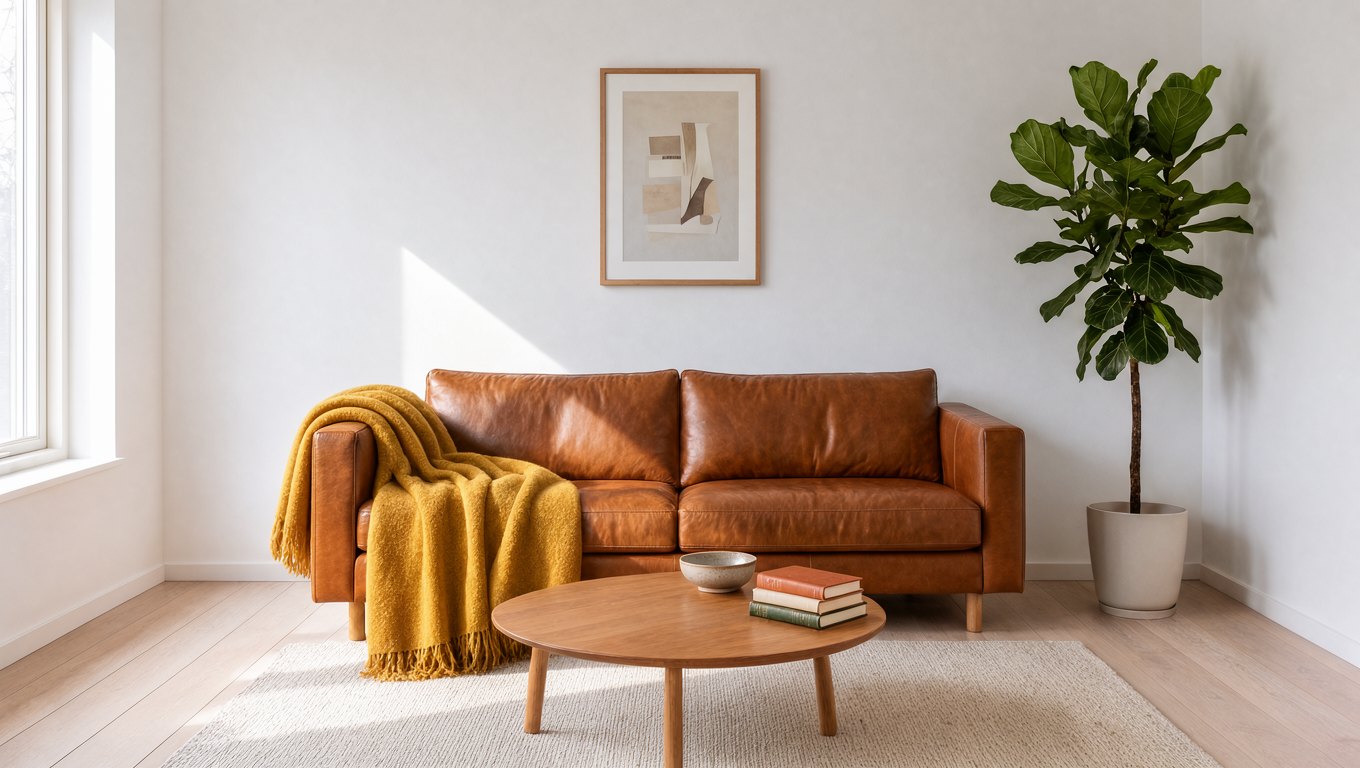
Last updated: October 27, 2026. Every image below was made on Try Krea 3 with Krea 3 on October 27, 2026.
To use Krea 3, open the editor, add your photos in order (image 1 is the one you are editing), write what should change and what should stay the same, leave Auto, 1K and Fast on, and click Generate. One image costs 20 credits. The mistake people make most often: the prompt mentions "image 3" but only two photos are uploaded.
This guide covers how to use Krea AI's newest model for real edits: the five clicks of a first edit, a prompt formula that works for most jobs, six prompts you can copy, the settings worth changing, and what to do when a result comes back wrong. We ran 20 generations on our editor to make it, and two of them failed in ways worth showing.
What Krea 3 is good at
Krea 3 is Krea's image model for editing photos from plain-language instructions, and it can also make an image from text alone. It reads up to 8 reference images. Krea says most edits finish in under 8 seconds at native 2K and keep products, characters, logos and text consistent (Krea user guide, checked October 27, 2026).
If you used Krea 2: Krea positions Krea 2 for exploring a look with style references, moodboards and LoRAs, and Krea 3 for instruction-following edits where a product or character must stay the same. That is why a Krea 3 prompt reads like an edit request, not a style description.
Your first Krea 3 edit in 5 steps
Step 1: Open the editor
Go to the Krea 3 image-to-image editor. The box starts with a sample prompt. Words in [square brackets] are the parts you replace.
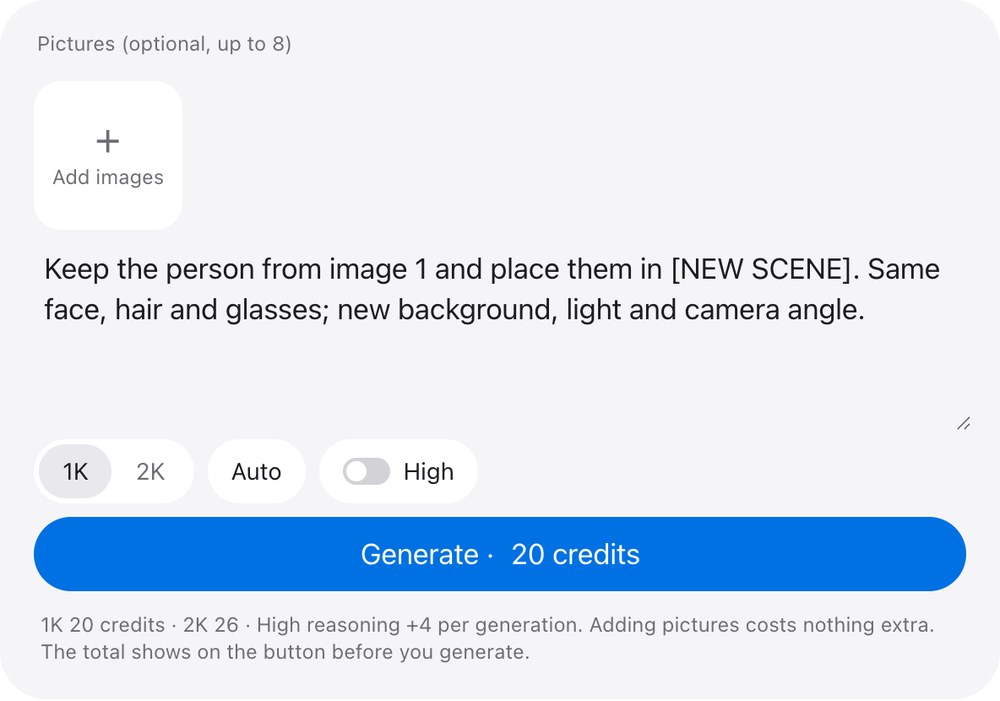
✓ Checkpoint: you see "Pictures (optional, up to 8)" above the prompt and a blue Generate button showing 20 credits.
Step 2: Add your photos in order
Click Add images and pick the photo you want to edit first. It gets the label Image 1. Every photo you add after it becomes Image 2, Image 3 and so on, and the prompt refers to them by those numbers.
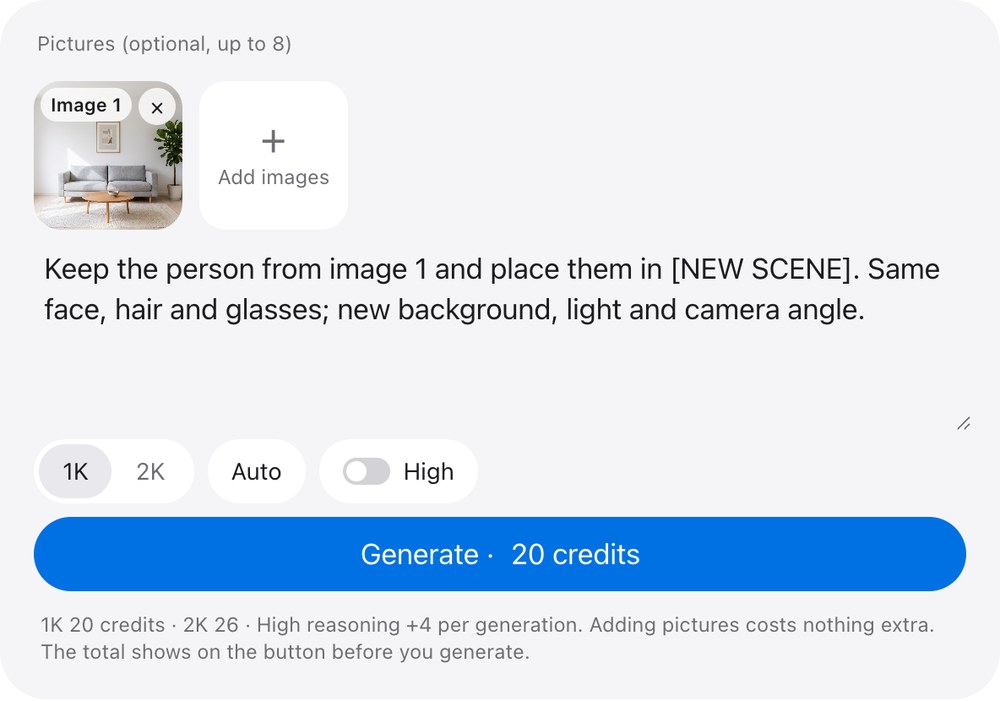
✓ Checkpoint: each thumbnail shows its number in the top-left corner.
Step 3: Write what changes and what stays
Replace the sample prompt with one change, then a list of what must stay. For this living room we changed the sofa and named everything near it.
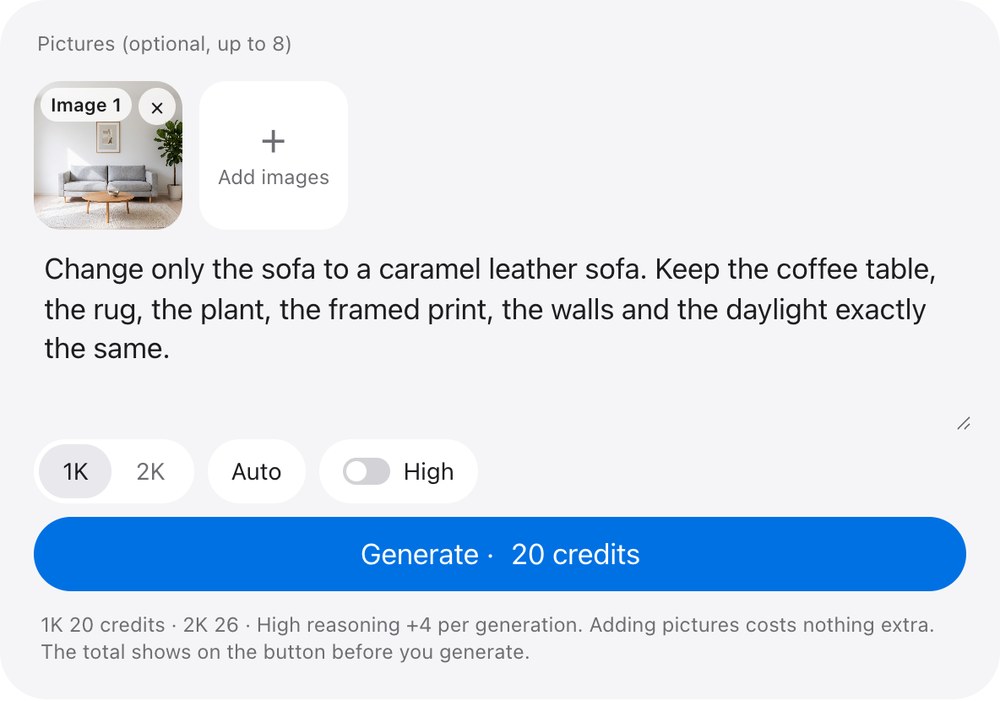
✓ Checkpoint: the prompt has one "Change only" sentence and one "Keep" sentence.
Step 4: Pick resolution, aspect ratio and reasoning
Leave Auto on to keep the shape of image 1. Pick 2K for print or small text. Krea recommends High for complex edits and for combining several references. The button updates before you spend anything: 1K with Fast shows 20 credits, 2K with High shows 30.
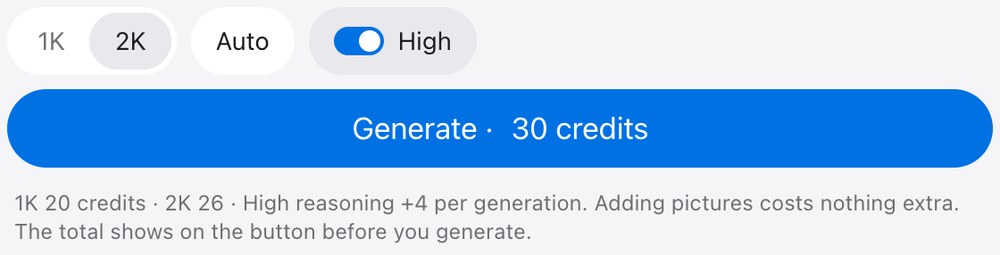
✓ Checkpoint: the credit total on the button matches what you expect to pay.
Step 5: Generate, compare, keep editing
Click Generate. Our sofa edit came back in 13.5 seconds. Drag the slider to compare before and after. To make a second change on top of this one, click Use result as reference: the result becomes the new image 1 and your prompt stays in the box.
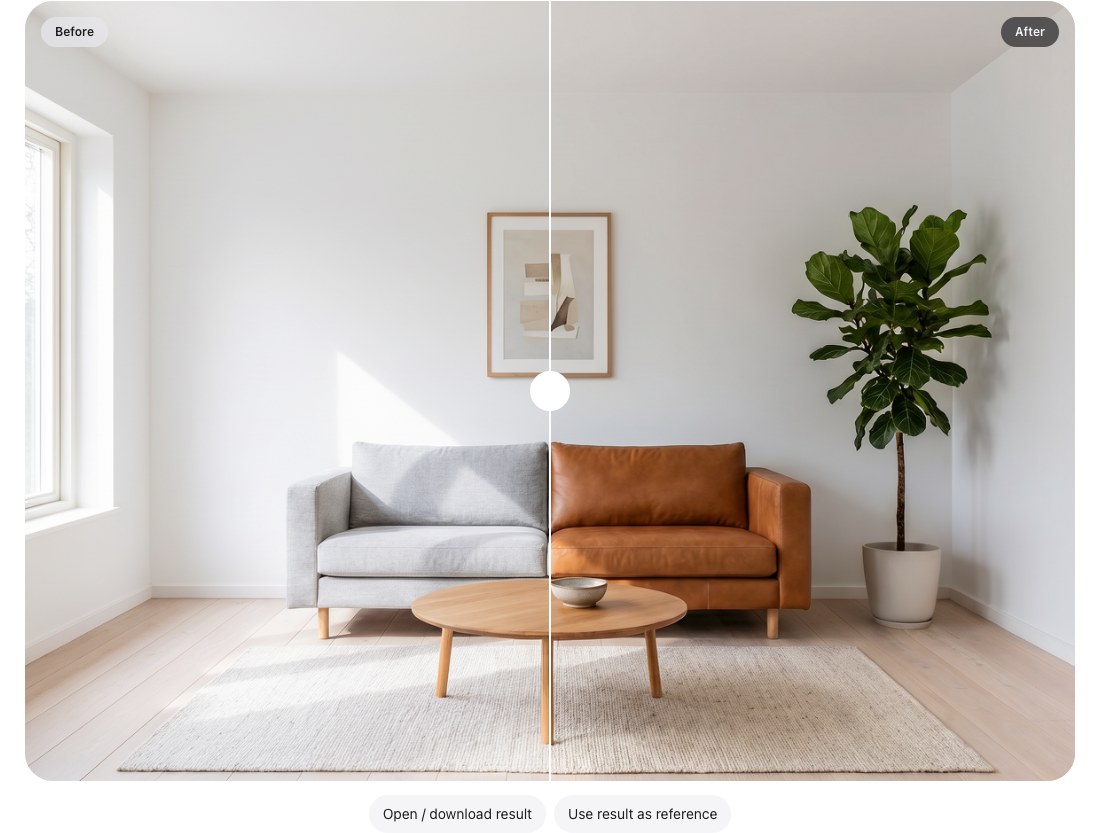
✓ Checkpoint: below the result you see Open / download result and Use result as reference.
How to write a Krea 3 prompt
Most good Krea 3 prompts follow one order: what changes → where it goes → what stays → the light.
- Point at photos by number. "The jacket from image 2", not "the jacket". Image 1 should be the photo you are editing.
- Give each extra photo one job. Image 2 brings the jacket, image 3 brings the bottle. One photo, one thing.
- List what stays, nearest things first. If you change a sofa, name the coffee table and the rug before the walls. The objects closest to the change are the ones most likely to move.
- Fill in anything the model would have to guess. If image 2 is a head-and-shoulders photo and you put the person on a sofa, say what they wear below the waist (see the combine example below).
Krea's own guide gives the same advice in shorter form: describe the change directly, say which reference brings what, and name the details that must not change.
Krea 3 prompts that work, by task
Each prompt below ran once on our editor at 1K with Fast, 20 credits. Copy it, swap the details for yours, and keep the structure.
Change one thing and keep the rest
Change only the sofa to a caramel leather sofa. Keep the coffee table, the rug, the plant, the framed print, the walls and the daylight exactly the same.
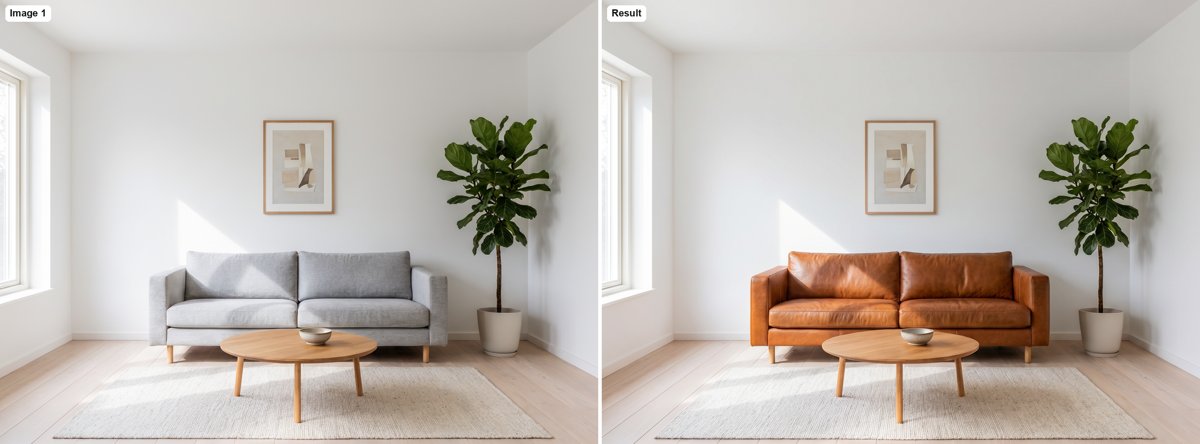
13.5 seconds. Only the sofa changed. The plant, print, table and light look the same side by side.
Put a product into a scene
Put the serum bottle from image 2 on top of the stone pedestal in image 1. Keep its black dropper cap and the NORA SERUM 30 ml label readable. Keep the tiles, the pedestal and the sunlight of image 1 exactly the same.
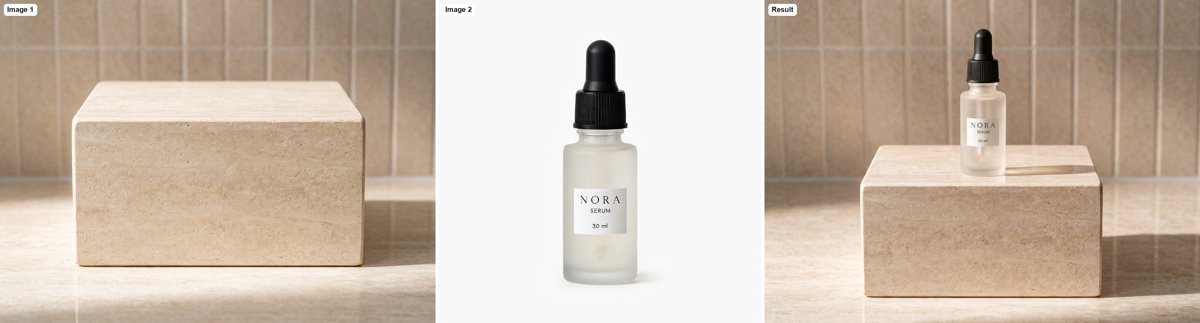
19 seconds. The label survived. Zoomed in, NORA, SERUM and 30 ml are all readable:
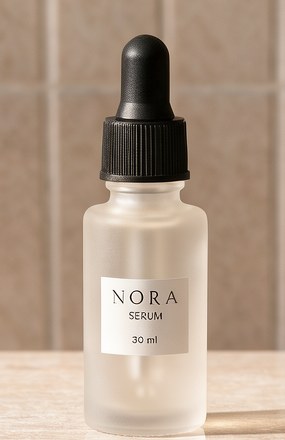
One catch: the pedestal got smaller and moved down. See When a Krea 3 result goes wrong for why and how to avoid it.
Change an outfit
Dress the woman in image 1 in the corduroy jacket from image 2, worn open over her white t-shirt. Keep her face, hair, pose, the grey wall and the light exactly the same.
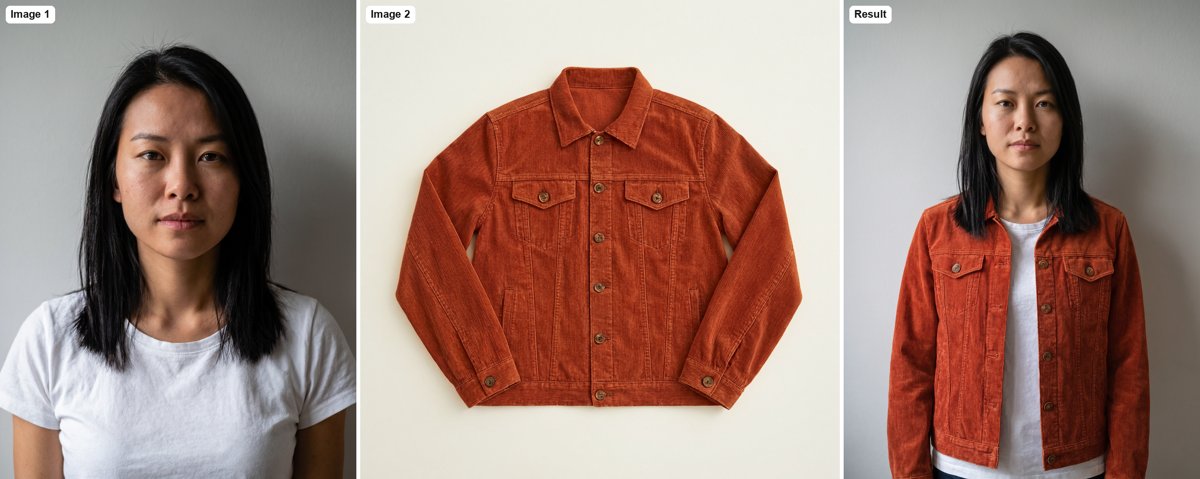
24.6 seconds. Same face, same hair, jacket worn open as asked. For more outfit prompts, see the AI clothes changer.
Try a new hairstyle
Change only her hair to a short curly bob with soft bangs. Keep her face, her white t-shirt, the grey wall and the light exactly the same.
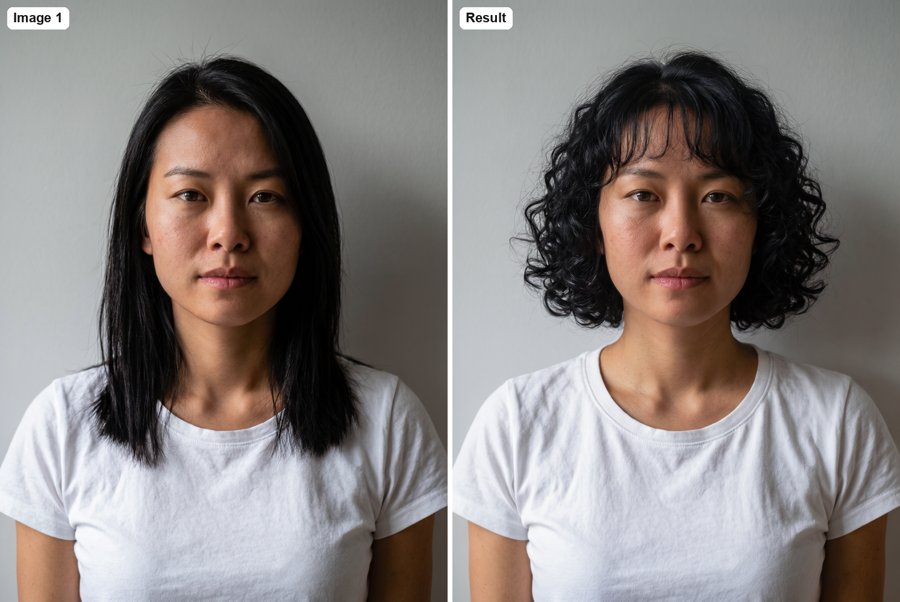
13.5 seconds. The face and background held. The AI hairstyle changer has ready-made prompts for common cuts.
Swap the background
Change only the background to a sunny street cafe with blurred tables and green awnings. Keep the woman, her face, hair and t-shirt exactly the same, and match the warm outdoor light on her.
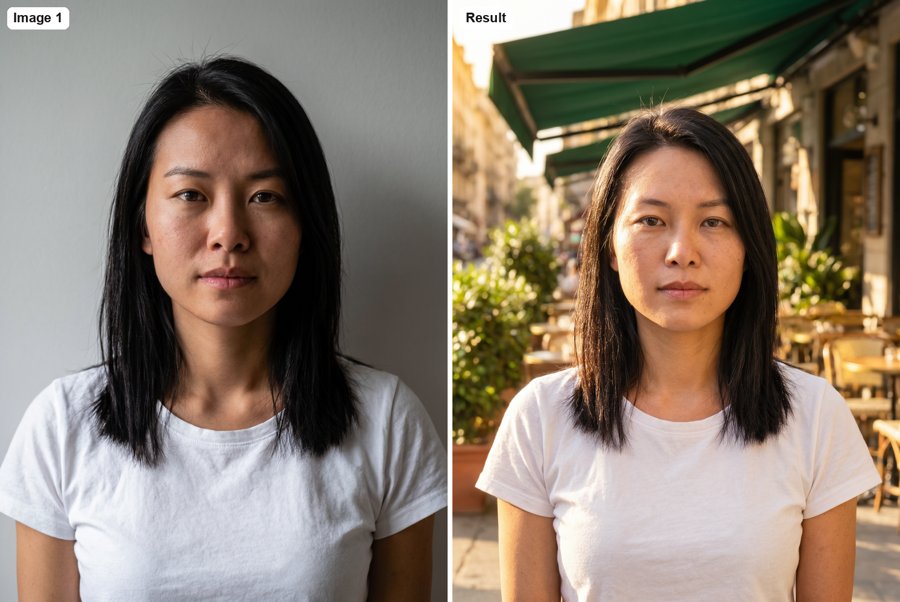
16.1 seconds. The last clause matters: without "match the warm outdoor light on her", a cut-out subject on a sunny street tends to look pasted in. Here her face picked up the warm light. More in the AI background changer.
Combine 3 or 4 photos
We gave Krea 3 four photos: the room, the woman, the jacket and the bottle.
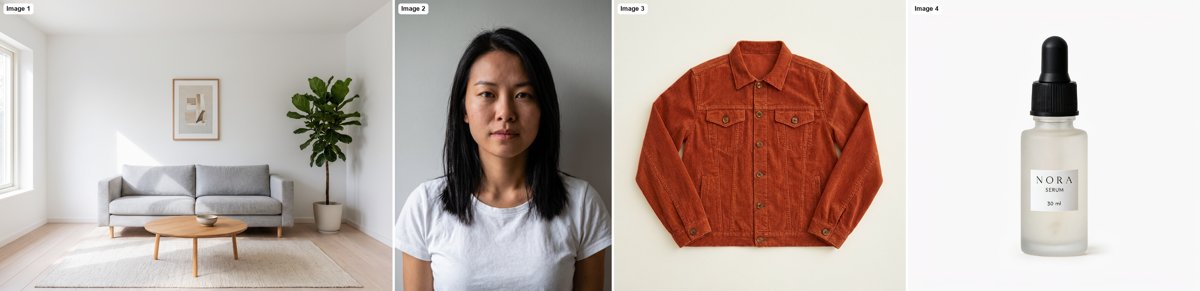
Seat the woman from image 2 on the sofa in image 1, wearing the corduroy jacket from image 3 and holding the serum bottle from image 4 in her right hand. Keep her face and hair, and the room and daylight of image 1.
The first try (24.2 seconds) got the face, the jacket and the bottle right, but she ended up bare-legged, because her photo stops at the chest and the prompt never said what she wears below it. The whole room also turned warmer. We added the missing details and ran it again (33.4 seconds):
Seat the woman from image 2 in the middle of the sofa in image 1, wearing the corduroy jacket from image 3 over her white t-shirt and dark blue jeans, holding the serum bottle from image 4 in her right hand with the NORA label facing the camera. The bottle is small, about the size of her palm. Keep her face and hair, and the room and daylight of image 1.
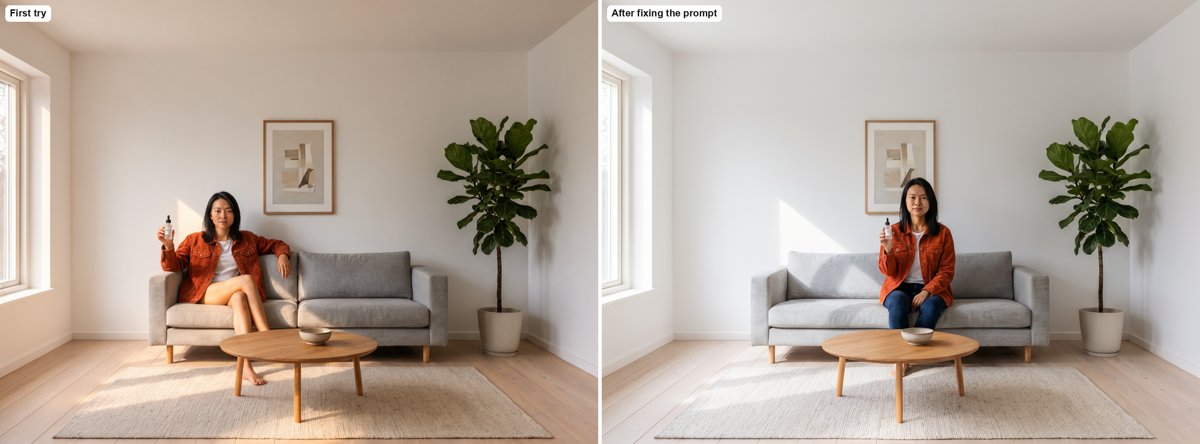
Jeans, center of the sofa, daylight back to the original. At 1K the bottle is too small in the frame to read the label, so use 2K if the product text has to be legible.
1K vs 2K: when resolution matters
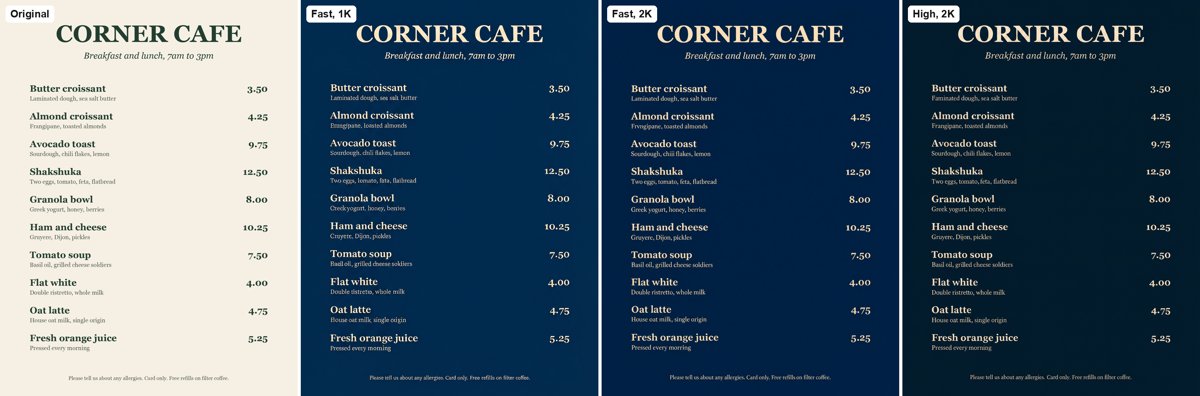
For a short headline, 1K is enough: when we changed a poster's title to NIGHT MARKET, Fast at 1K spelled it right in 14 seconds. Small print is where 1K breaks. To see it, we designed a cafe menu with 10 dishes, each with a one-line description in small type, gave it to Krea 3, and asked for a color change that forces it to redraw every word:
Change the background to deep navy and all the text to cream. Keep every menu item, description, price and the footer line exactly the same, word for word, in the same layout and fonts.
We ran the same prompt three ways. Shrunk to fit a screen, they look the same:
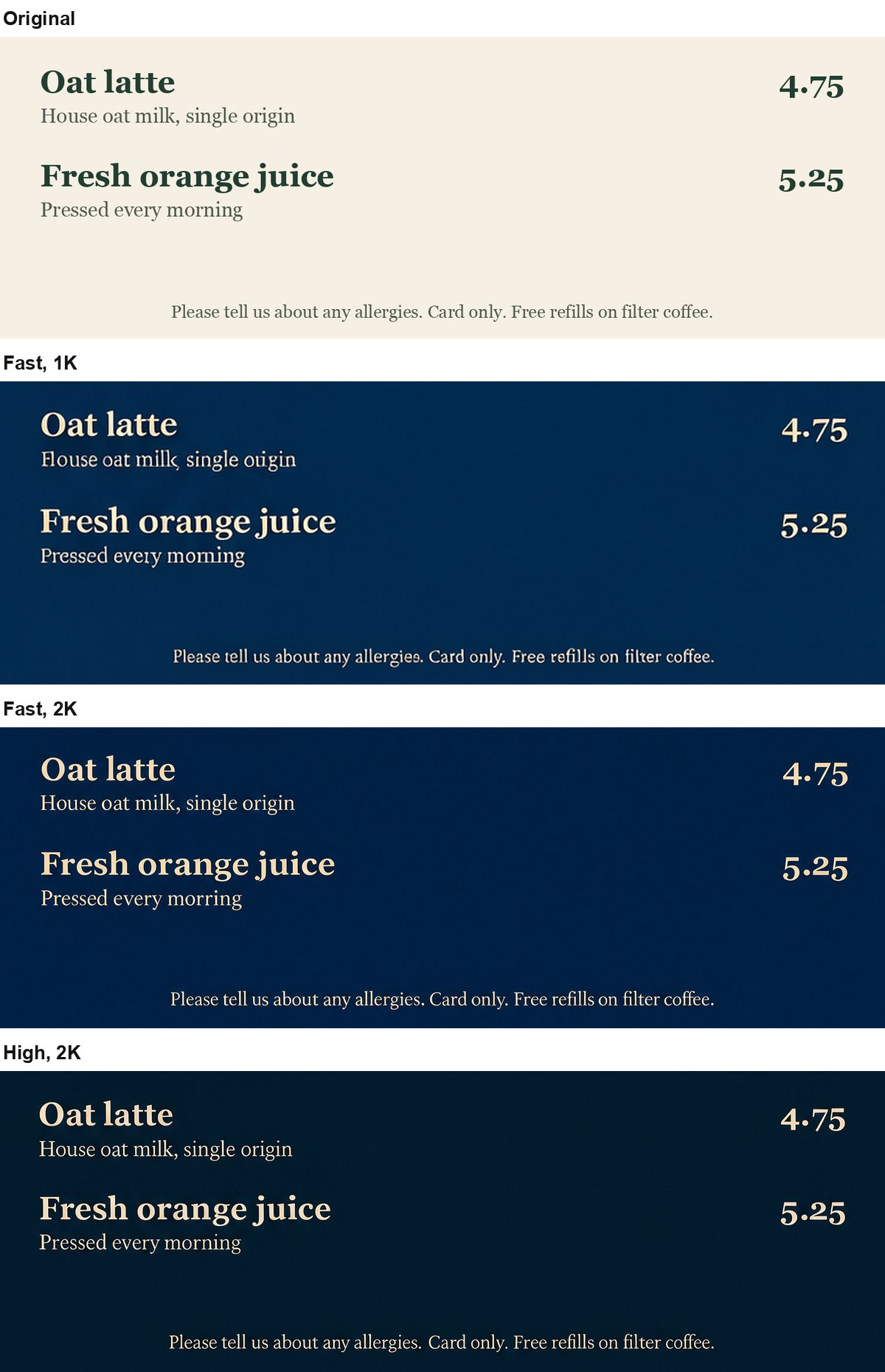
Zoom into the same corner and they don't:
| Setting | Credits | Time | Misspelled words in the 40-word descriptions |
|---|---|---|---|
| Fast, 1K | 20 | 12 seconds | 17 (Flouse, oiigin, moming, Baril oll…) |
| Fast, 2K | 26 | 18.5 seconds | 3 (Frvngipane, chiii, morring) |
| High, 2K | 30 | 32.6 seconds | 1 (Faminated) |
The dish names and prices were correct in all three. The difference is all in the small lines: 2K gives each letter enough pixels to stay a letter, and High fixed two of the three words 2K still got wrong. So for menus, labels, packaging and anything with small print, use 2K, add High if every word must be right, and still proofread the result before you use it.
Krea 3 settings and limits
| Setting | What it does | When to change it |
|---|---|---|
| Pictures | Up to 8 reference images, PNG, JPEG or WebP, 5 MB each, 20 MB total | Add only the photos the prompt uses |
| Aspect ratio | Auto follows image 1; ten fixed ratios from 9:16 to 21:9 | Set it when the output needs a different shape, such as 9:16 for a story |
| Resolution | 1K (20 credits) or 2K (26 credits) | 2K for small print (17 misspelled words at 1K vs 3 at 2K in our menu test), print, or products small in the frame |
| High reasoning | Plans the edit more carefully, adds 4 credits | Several references at once, or when Fast missed the instruction |
| Text only | No pictures, prompt only | Making a base image to edit later |
Speed in our runs, counted from clicking Generate to the result showing in the editor: prompt-only images took 7.9 to 10.4 seconds, one-photo edits at 1K 12 to 16.1 seconds, two-photo edits 18.6 to 24.6 seconds, four-photo edits 24.2 to 33.4 seconds, and one-photo edits at 2K 18.5 seconds with Fast and 25.8 to 32.6 seconds with High. Krea recommends Fast as the default and High for complex or multi-step edits (Krea 3 API guide, checked October 27, 2026). Credit packs and what they cost are on the pricing page.
When a Krea 3 result goes wrong
The editor says a picture is missing. If the prompt names image 2 and only one photo is uploaded, Generate does not run and nothing is charged. You see this note under the prompt:
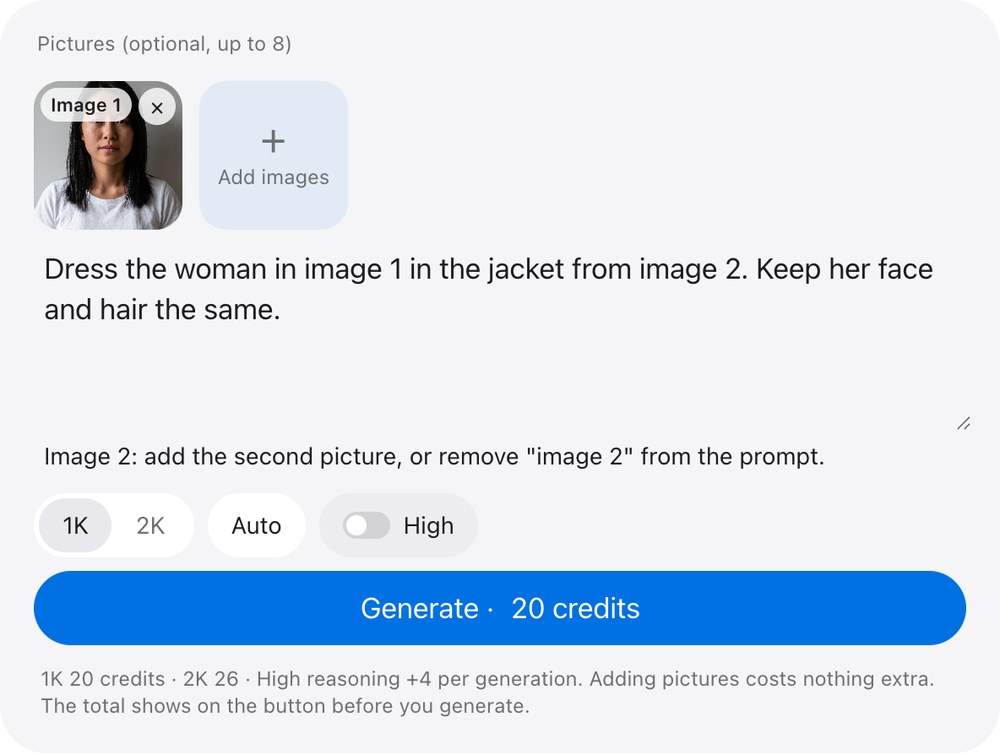
Add the photo or fix the number.
Krea 3 changed something you did not ask for. Name it in the keep list. In the four-photo combine, saying "white t-shirt and dark blue jeans" and "the room and daylight of image 1" fixed both the bare legs and the warm color shift.
The scene zoomed out. When the thing you are adding needs space the original photo does not have, Krea 3 pulls the camera back to make room. Our pedestal filled the frame, so placing a bottle on top shrank it. Adding "keep the pedestal the same size and in the same place in the frame" made it wider again but did not stop it moving down:
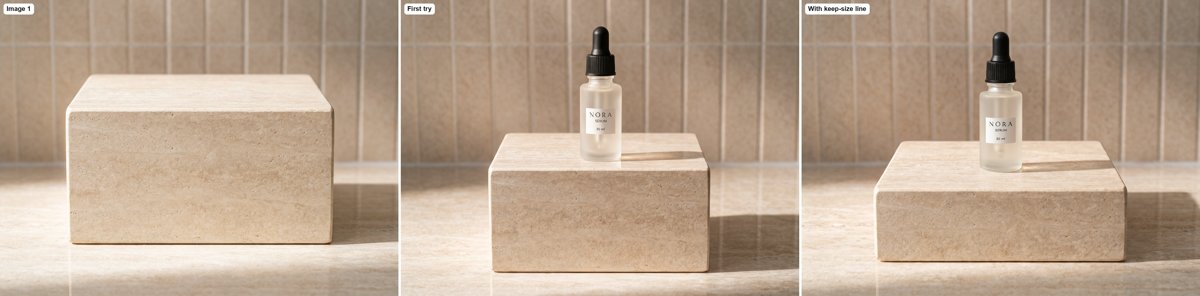
The real fix is in image 1: leave empty space where the new object will go.
Text is misspelled or blurred. Switch to 2K, and turn on High if it still has typos. In the menu test above that took small-print errors from 17 to 1. Put new words in capitals exactly as they should read, and proofread before you publish.
FAQ
How do I refer to images in a Krea 3 prompt?
By number, in the order you added them: image 1, image 2 and so on. Make image 1 the photo you are editing and say what each other image brings, such as "the jacket from image 2".
How many reference images can Krea 3 use?
Up to 8, according to Krea's API documentation, and our editor accepts 8. Most edits need two to four. Each extra photo should have one job in the prompt.
Can Krea 3 make an image from text only?
Yes. Leave the pictures empty and describe the image. In our runs, prompt-only images took 7.9 to 10.4 seconds at 1K.
How much does a Krea 3 edit cost?
On Try Krea 3, one image costs 20 credits at 1K or 26 at 2K, plus 4 with High reasoning. Reference images are included. New accounts get 24 starter credits; see pricing for packs.
How do I stop Krea 3 from changing the rest of my photo?
Write "Change only" before the one change, then list what must stay, starting with the objects closest to the change. A short list of named objects works better than "keep everything".
Try these prompts on your own photos
Every prompt above works as a starting point: swap in your own photos, keep the order of image numbers, and keep the change-then-keep structure. Open the Krea 3 editor and start with a single change.
Sources
- Krea, "Krea 3" user guide, https://www.krea.ai/docs/user-guide/features/krea-3 (checked October 27, 2026)
- Krea, "Krea 3 API guide", https://www.krea.ai/docs/developers/krea-3/overview (checked October 27, 2026)
- Try Krea 3 test log: 20 generations on trykrea3.com/image-to-image, October 27, 2026, 03:12 to 03:35 UTC
Edit your own photo with Krea 3
Upload a photo, say what to change, and get the edit back in about 7 seconds. New accounts get 24 starter credits.
Edit a photo →Was this helpful?