Last updated: October 21, 2026. Tested by the Try Krea 3 team.
Krea 3 edits a product or character image in about 7 seconds and keeps labels and faces intact across repeated edits. That is the short version of this Krea 3 review. The longer version: small printed text still breaks, six-image composites get the proportions wrong, and krea.ai's Change Region tool finished the job in only one of our three tries. We ran 16 generations through Krea's API and 5 more on krea.ai between October 19 and 21, 2026, and every number below comes from those runs.
Krea 3 review: the short verdict
| What we checked | Verdict |
|---|---|
| Edit speed | About 7 seconds for a single-image edit at 1K. Text-to-image took about 4.5 seconds. |
| Product preservation | Strong. A bottle label stayed sharp through three rounds of edits. |
| Character consistency | Strong. An outfit swap left the face, glasses and freckles visually unchanged. |
| Small text | Weak. A nutrition label came out as gibberish in Fast mode and still had typos in High mode at 2K. |
| Multi-image composites | Usable with checks. Six references were combined, but object scale was wrong. |
| Selecting an area to edit | Unreliable on krea.ai: 1 of 3 Change Region runs finished the recolor. |
Want to run these tests yourself? Open the Krea 3 editor on Try Krea 3 and see the credit cost before you generate.
What is Krea 3?
Krea 3 is the image editing model from Krea AI. Krea released it as a beta on October 15, 2026, in its web app and its API. It takes a prompt plus optional reference images, and it is built for edits where the subject must stay the same: a product in a new scene, a person in a new outfit, a sign with new text.
Krea 3 has three thinking modes. Fast is the default. High plans complex edits more carefully. Ultra generates several candidates, checks them against your prompt and references, and returns the best one; according to Krea's API docs it always outputs 2K, needs at least one reference image, can take several minutes, and is limited to Max plans and above. We did not test Ultra.
Is Krea 3 open source? As of October 21, 2026, we found no official release of Krea 3 weights. It runs on krea.ai, through Krea's API, and on independent sites that connect to it, including ours.
If you came here for a broader Krea AI review, note that this one covers the Krea 3 model only, not Krea's video, upscaling or realtime tools.
How Krea 3 compares, by Krea's own numbers
Krea's launch post positions Krea 3 against Nano Banana Pro and GPT Image 2 on speed and price. These are Krea's figures, measured on Krea's platform, without image references. We did not run the other two models.
| Model | Price per image | Monthly cost of 100,000 edits |
|---|---|---|
| Krea 3 (2K) | $0.06 | $6,000 |
| Nano Banana Pro | $0.135 | $13,500 |
| GPT Image 2 | $0.22 | $22,000 |
Krea also says most Krea 3 edits finish in under 8 seconds at 2K. Our own speed numbers are below.
How we tested Krea 3
- Model: Krea 3, called through its API with default settings unless noted. Speed depends on where and how you run it, so treat our timings as one data point, not a guarantee.
- Runs: 16 API generations across 2 days, all returned an image, nothing retried. Plus 5 runs in the krea.ai web app.
- Inputs: simple product and scene drawings we made ourselves, plus people and rooms generated by Krea 3 from text. No real photos of real people.
- Settings: 1K square output and Fast mode unless noted.
- Recorded for every run: the exact prompt, the input images, the model time reported by the API, and the total wait.
- What we judged: did it do what we asked, did it change anything we did not ask for, and is the result usable without fixing.
Krea 3 tested: 6 hands-on tests
Test 1: Product edits that keep the label
We started with a flat drawing of a green-cap bottle labeled "SAMPLE 01 / TEST PRODUCT" and asked Krea 3 to put it on a stone shelf.
Place the bottle from image 1 on a pale stone shelf with soft morning window light. Preserve its shape, dark green cap and the exact label text SAMPLE 01 and TEST PRODUCT. Keep the entire bottle visible.
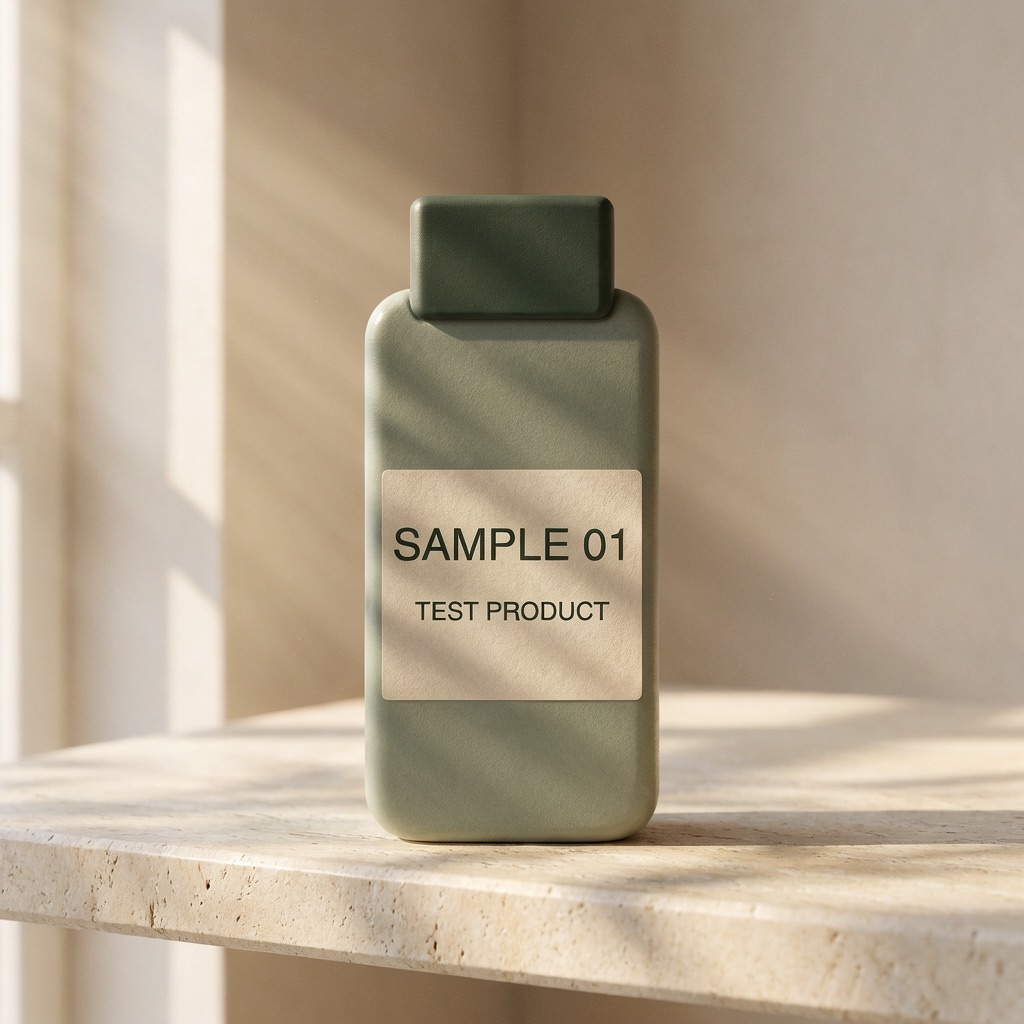
The edit came back in 7.1 seconds with the bottle shape, cap color and both lines of label text exactly right. We then changed only the wall color, then added a leaf to the shelf. After the third edit the label was still crisp and nothing else drifted visibly.
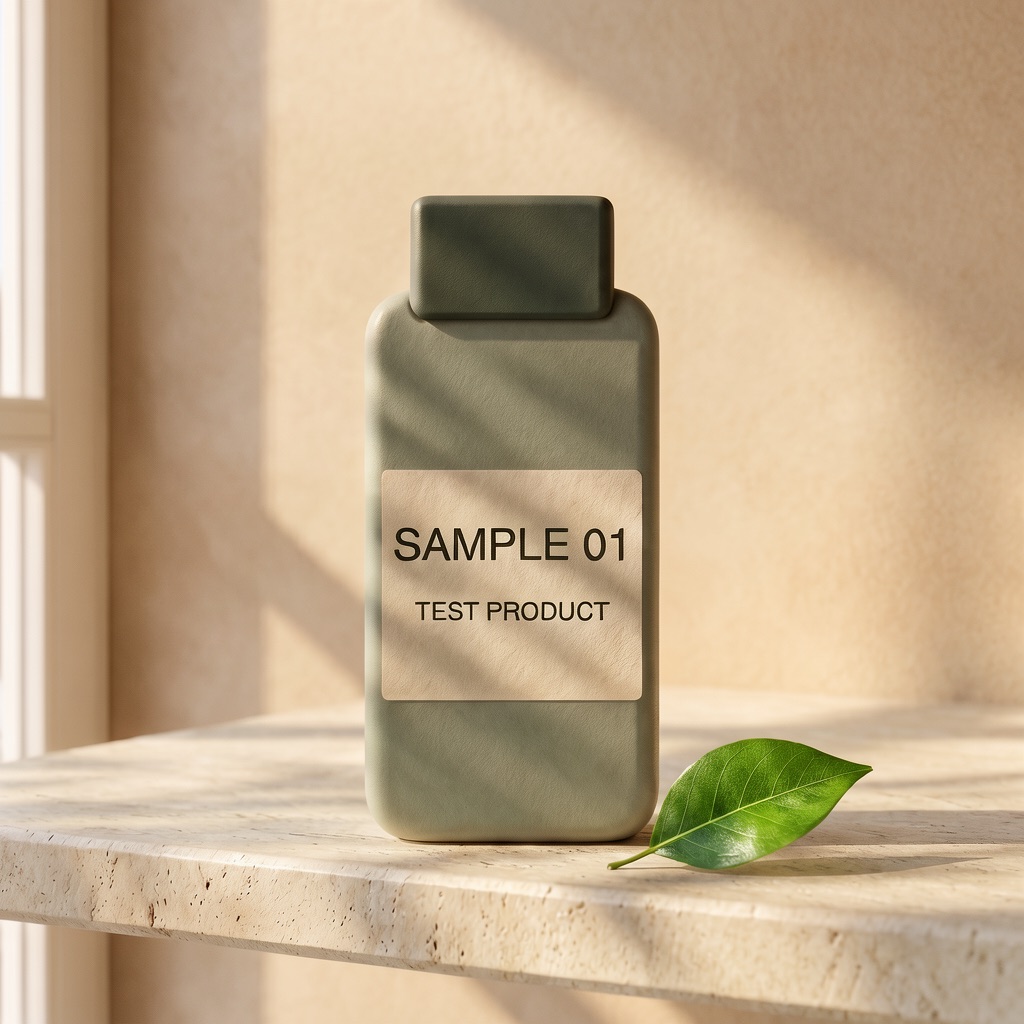
Placing the same bottle onto a pedestal from a second image took 9.2 seconds. Two days later we ran the identical prompt again and got almost the same composition, with the bottle slightly smaller and the colors slightly warmer. For repeatable product shots, that is useful. More product examples are on our AI background changer page.
Test 2: Same person, new outfit (Krea 3 as a clothes changer)
We generated a fictional woman with short curly hair, freckles and tortoiseshell glasses, then asked for an outfit change only.
Change only her outfit to a red wool trench coat over the white t-shirt. Keep her face, hair, glasses, freckles, pose, framing and the grey wall exactly the same.

Side by side, after a 6.9-second edit, we could not see any change to her face, hair, glasses or the background. When we moved her to a sunny street in a denim jacket, she was clearly the same person, though the backlight lightened her hair and made her look a little younger.

One small miss: our prompt asked for a woman in her early thirties, and the result looks closer to forty.
We ran more outfit tests, including a jacket taken from a product photo, on our AI clothes changer page, and hairstyle and hair color tests on the AI hairstyle changer page.
Test 3: Swapping a material, and what "only" really means
We generated a living room with a grey fabric sofa, then asked Krea 3 to change only the upholstery to cognac leather. We ran it twice: once as a normal edit and once with the API's experimental regional edit option turned on.
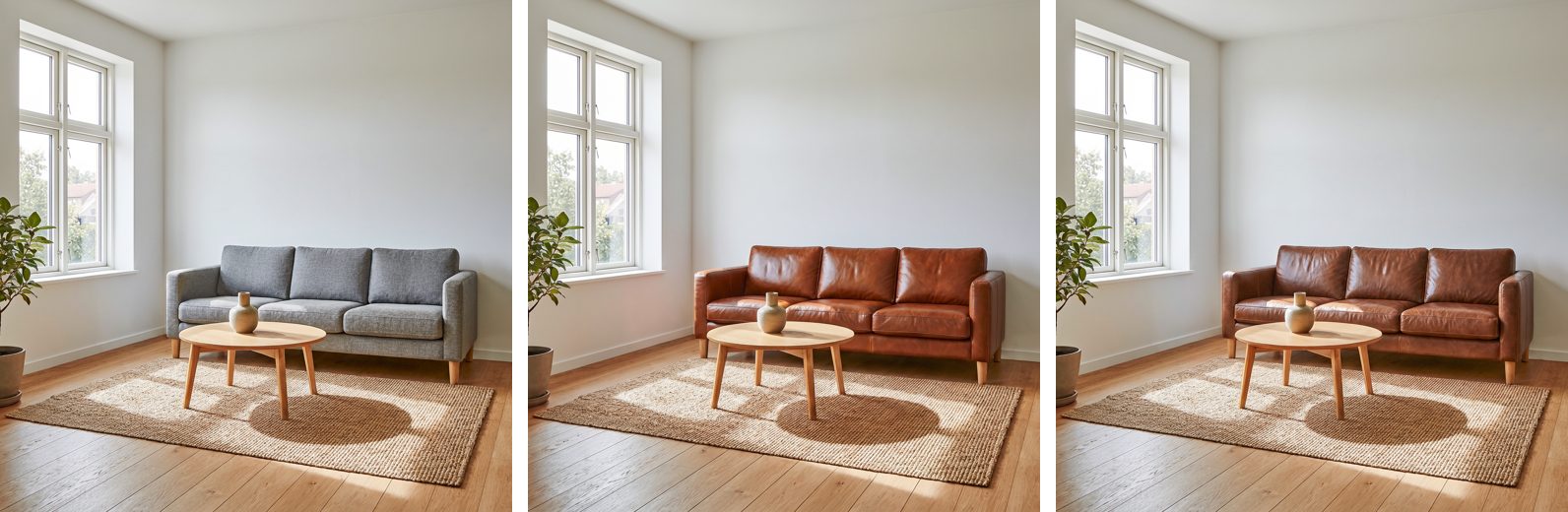
To the eye, both results look the same: leather sofa, everything else untouched. So we compared the pixels outside the sofa against the original image.
| Average pixel change outside the sofa | Share of pixels that visibly changed | |
|---|---|---|
| Normal edit | 8.27 | 9.75% |
| Regional edit | 0.51 | 0.24% |
A normal edit redraws the whole picture very closely. Regional edit actually leaves the rest alone. The outfit swap in Test 2 showed the same thing: about 11% of the pixels in the face area changed even though nothing looked different.
Why care about invisible changes? Because they add up when you edit the same image round after round. Regional edit took 9.5 seconds instead of 6.7. If you are iterating on one master image, turn it on.
Test 4: Small text, the weak spot
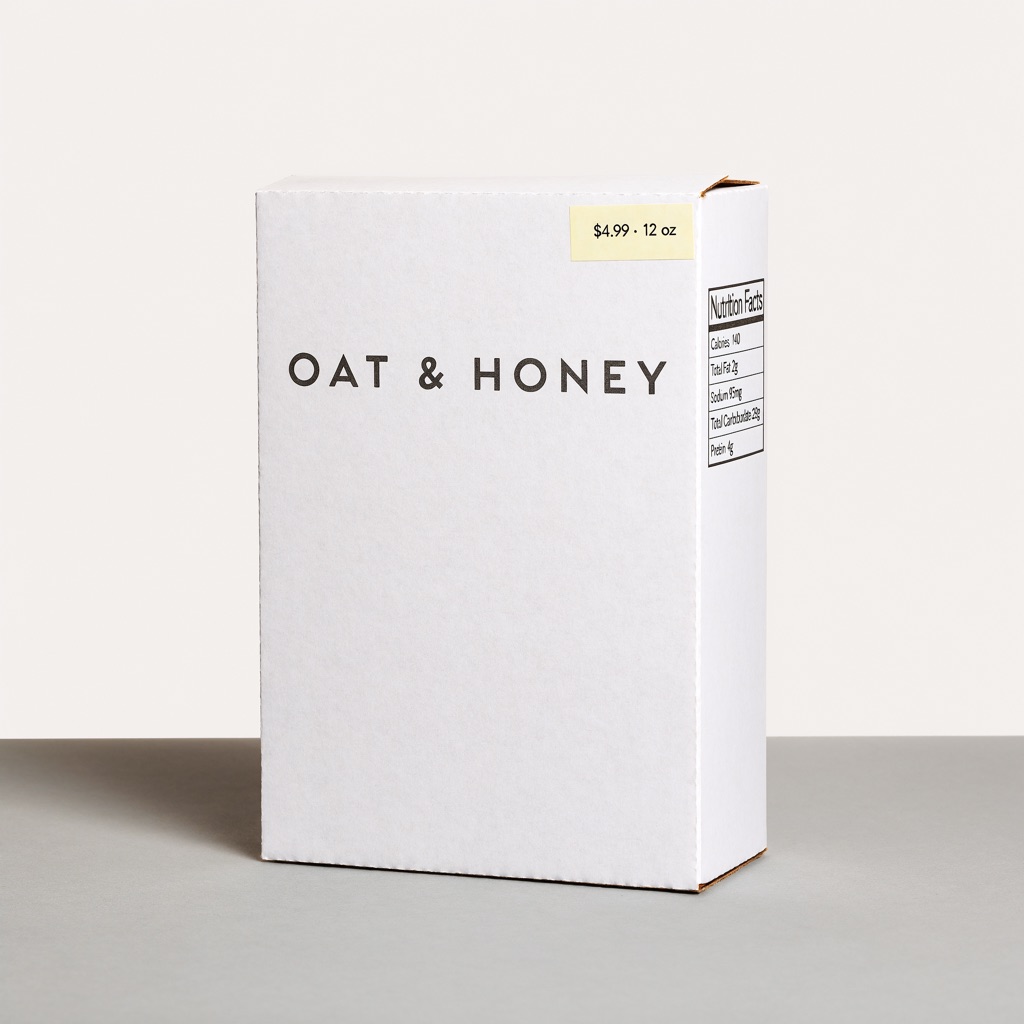
Krea's launch post says the model keeps text intact. Large text, yes. Small text, not yet. We asked for a cereal box with a brand name, a price sticker and a nutrition panel.
Studio product photo of a matte white cereal box ... a small yellow price tag sticker reading "$4.99 · 12 oz", and a nutrition facts panel on the side listing Calories 140, Total Fat 2g, Sodium 95mg, Total Carbohydrate 29g, Protein 4g. All text sharp and legible.
In Fast mode at 1K (4.3 seconds), the brand name and the price sticker were correct. The nutrition panel was unreadable; only "Calories 140" could be made out.
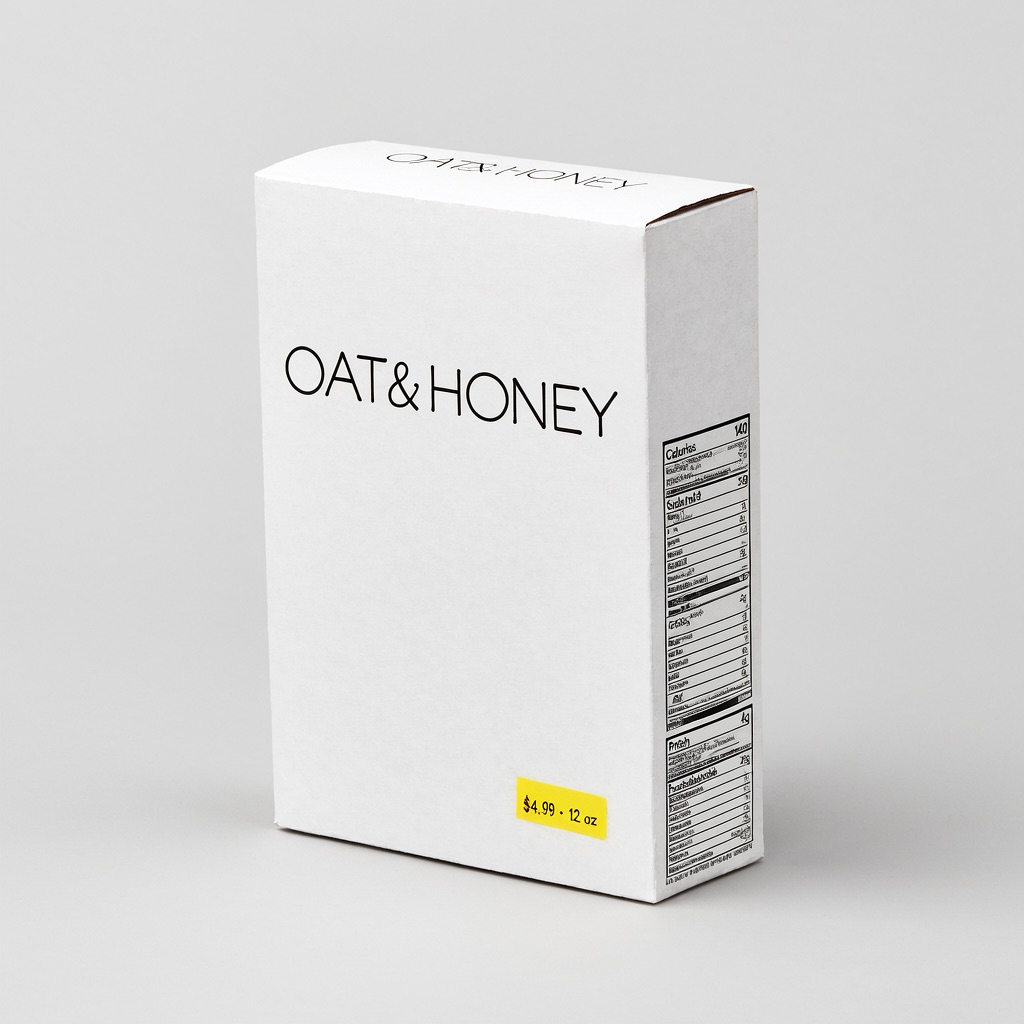
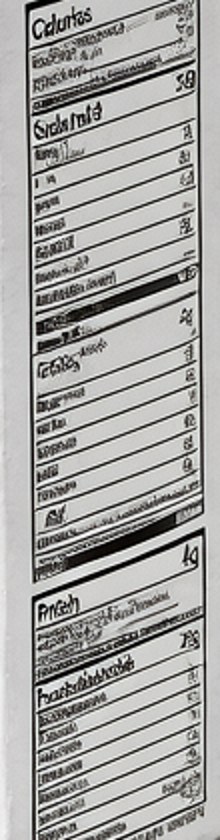
High mode at 2K (18.7 seconds) got all five numbers right, but "Carbohydrate" became "Carbobulate" and "Protein" became "Pretein". The yellow sticker also turned pale beige.
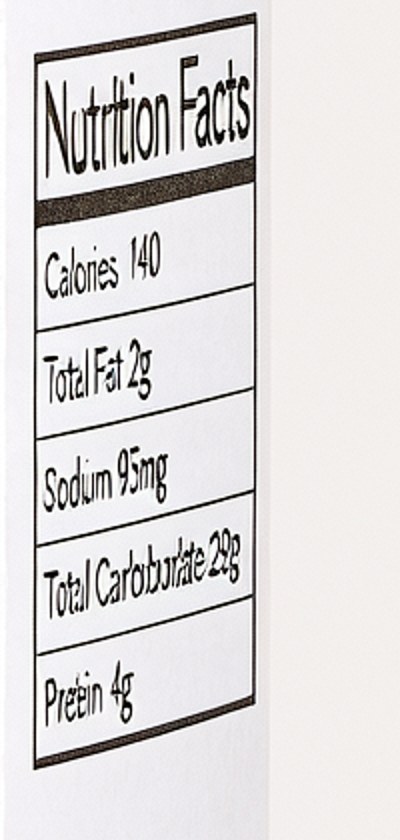
If you need ingredient lists, legal copy or fine print on packaging, add it in a design tool afterwards.
Test 5: Six references in one image
Krea says it supports up to 6 references, so we used all 6: two bottles, a pedestal, a beige wall, the woman and the living room.
Combine all six images into one scene: the woman from image 5 sits on the sofa from image 6 holding the green-cap bottle from image 1; the pedestal from image 2 stands beside the sofa with the bottle from image 3 on it, and the beige wall from image 4 replaces the room wall. Keep the bottle label text SAMPLE 01 readable.
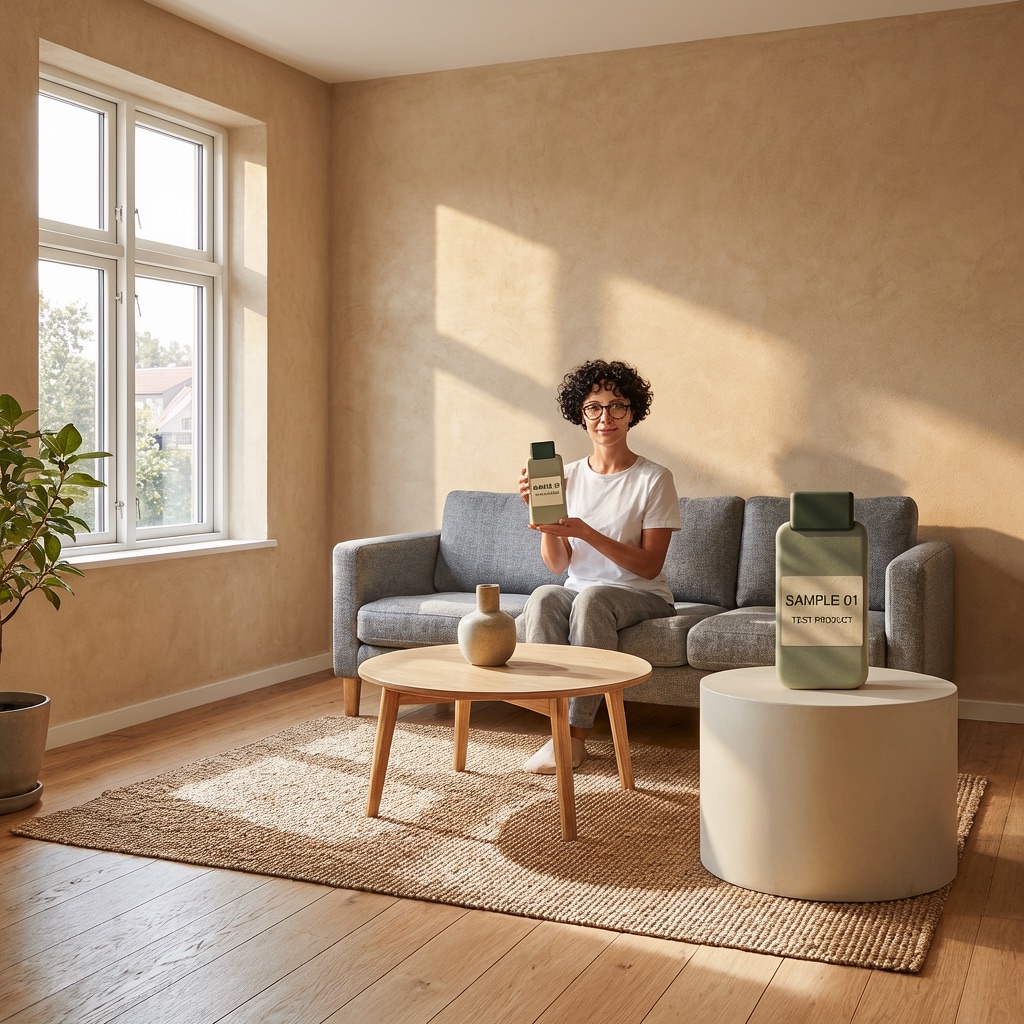
This was the slowest run in our test at 21.1 seconds. Every instruction was followed: she sits on the sofa, holds a bottle, the pedestal stands beside her and the wall is beige. But the bottle on the pedestal is several times larger than the one in her hand, the label on the bottle in her hand is blurred, and she is now wearing grey sweatpants we never asked for.
Treat composites as a first draft. Check proportions and small details before you use one.
Test 6: A vague prompt
We gave the product shot from Test 1 the laziest possible instruction: "Make it better."
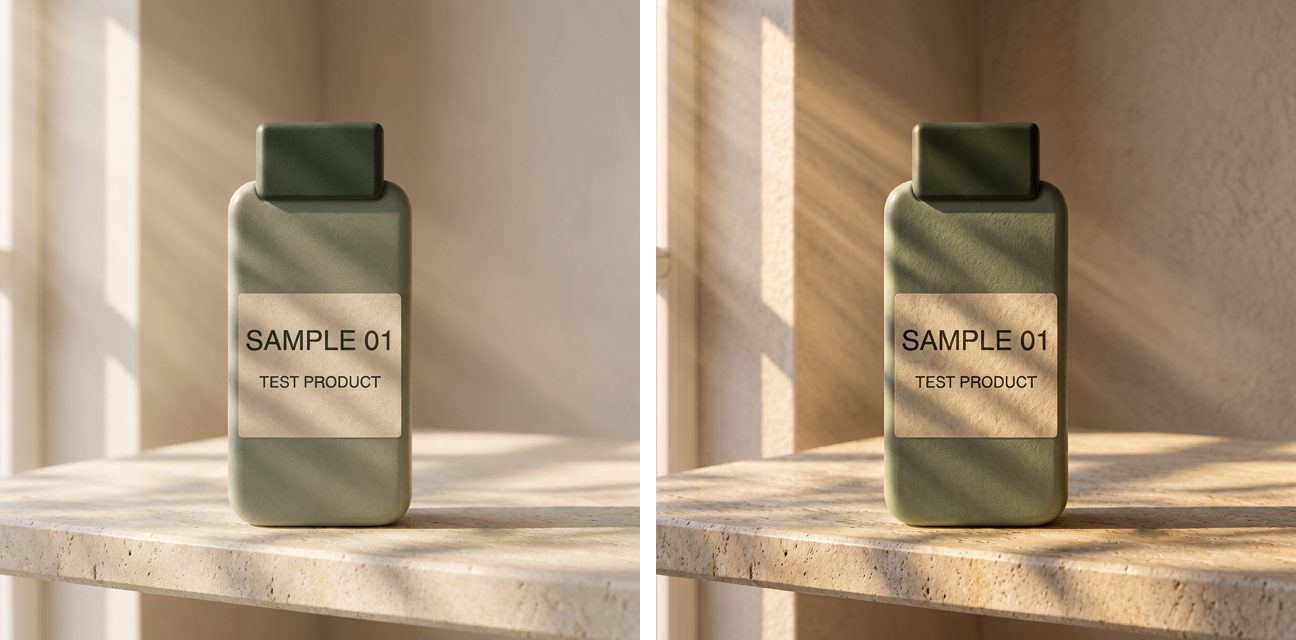
Krea 3 played it safe. It added warmer, stronger light and more stone texture, and left the bottle, label and framing alone. It did not invent a new scene.
Krea 3 on krea.ai: what the image editor adds
We also signed in to krea.ai on Krea's starter plan to see how the model is presented to regular users. One Fast text-to-image generation was quoted at about 36 credits.
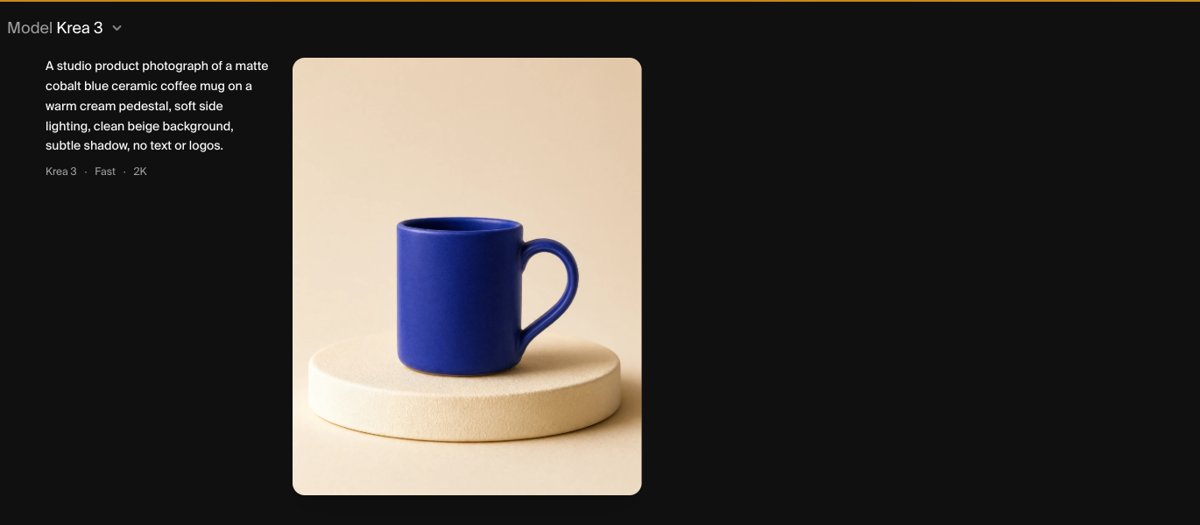
A studio product photograph of a matte cobalt blue ceramic coffee mug on a warm cream pedestal, soft side lighting, clean beige background, subtle shadow, no text or logos.

The result was labeled Krea 3 · Fast · 2K and matched the prompt.
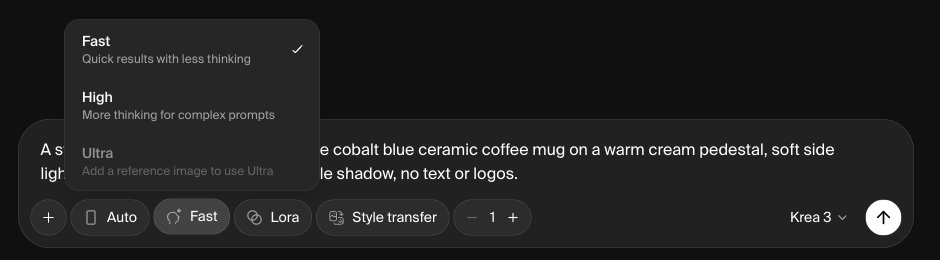
The mode menu offers Fast, High and Ultra. Ultra stays greyed out until you add a reference image.
The editor adds tools around the model: an AI Edit box with room for 7 image references, plus Annotate, Change Region, Crop & Expand, Background Removal, Change Lighting, Draw and Change Camera Angle. Change Region lets you pick Krea 3 as its model; we did not check which models the other tools use.
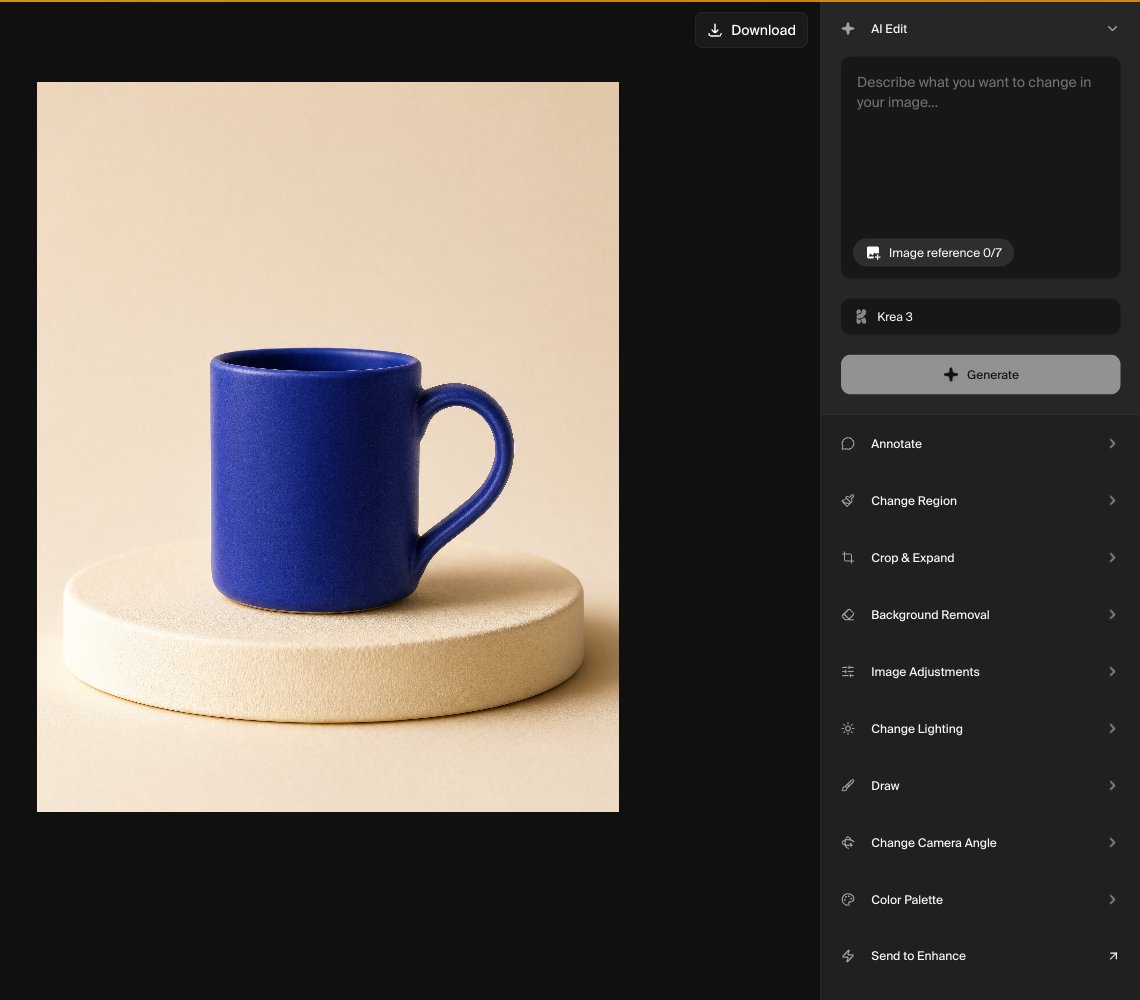
Change Region vs AI Edit on krea.ai
Change Region lets you select part of the image and edit only that area. We tested it against a plain AI Edit on the same blue mug, asking for a terracotta red mug both times. Auto-Mask picked out the mug cleanly with one click:
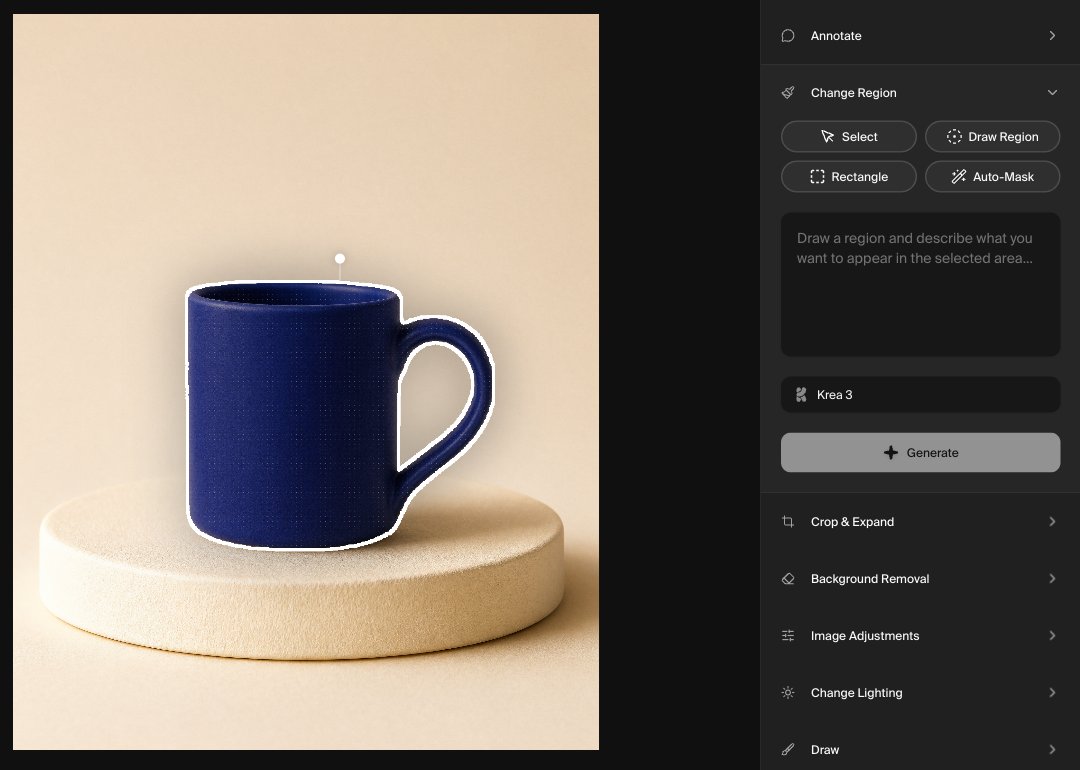
We ran Change Region three times with the same selection and prompt, starting from the original each time.
| Mug fully red? | Time to result | Pixels outside the mug that visibly changed | |
|---|---|---|---|
| AI Edit (whole image, no selection) | Yes | not timed | 2.74% |
| Change Region, run 1 | No: rim and handle red, large blue patch on the body | about 60 s | 0.02% |
| Change Region, run 2 | Yes | 47 s | 0.70% |
| Change Region, run 3 | No: rim and handle red, body still blue | 43 s | 0.49% |
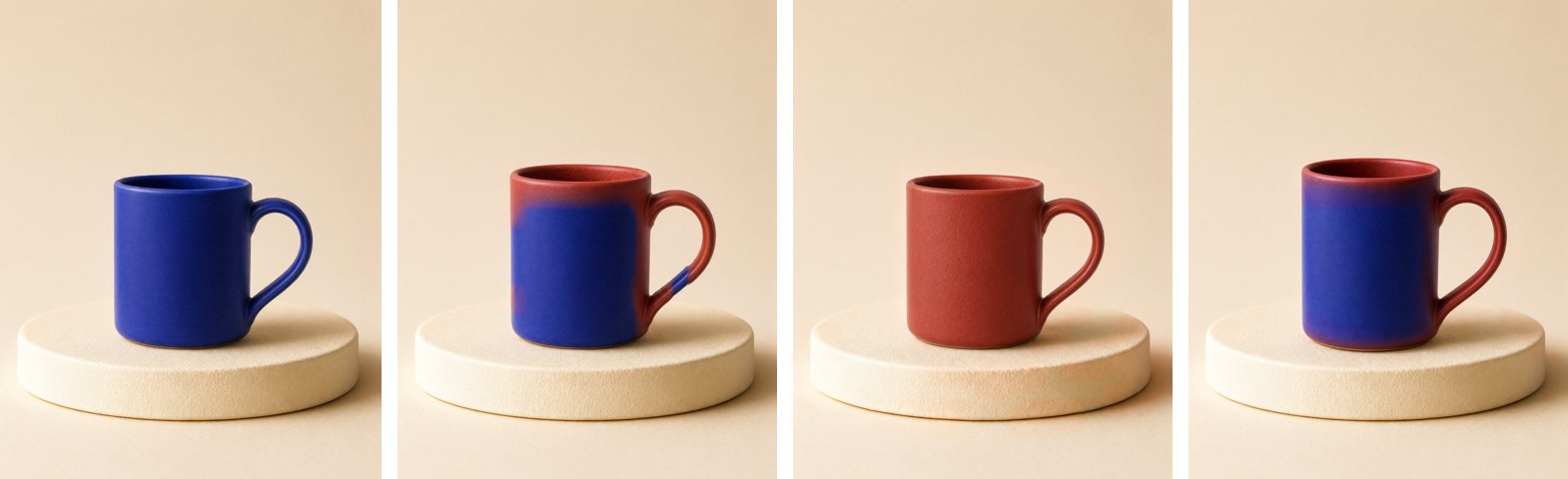
Change Region protected the rest of the image every time, which is the point of a selection. But the edit inside it worked only once in three tries. Each time the editor rewrote our prompt to "Change only @1: Make the mug terracotta red matte ceramic.", which suggests the selection is passed to Krea 3 as a marked reference rather than a hard mask. Each result also came back 16 pixels taller than the original.
For a simple recolor, plain AI Edit was the reliable choice. Use Change Region when protecting the rest of the image matters more, expect to run it more than once, and check the inside of the selection before you use the result.
Outside krea.ai there is no selection tool: the Krea 3 API has no mask or box input. Its regional edit switch lets the model decide what to change from your prompt, and in Test 3 it kept 99.76% of the pixels outside the sofa unchanged while still finishing the edit. Reference limits also differ by surface: Krea's launch post says 6, the API accepts 8, and the krea.ai editor shows 7.
Krea 3 speed and pricing
| Task | Model time |
|---|---|
| Text to image, 1K Fast | 4.3 to 4.6 s |
| One-image edit, 1K Fast | 6.7 to 7.2 s |
| Two-image edit, 1K Fast | 8.0 to 9.2 s |
| Regional edit, 1K Fast | 9.5 s |
| Two-image edit, 1K High | 16.1 s |
| Text to image, 2K High | 18.7 s |
| Six-image edit, 1K Fast | 21.1 s |
Model time is what the API reports; the full wait until the file was downloaded added 3 to 7 seconds. We did not test 2K edits, so we cannot confirm Krea's "under 8 seconds at 2K."
High mode roughly doubled the time of the same two-image edit (16.1 vs 9.2 seconds) with no visible gain, so Fast was enough for most of our edits.
On price, Krea lists Krea 3 at $0.03 per image at 1K and $0.06 at 2K, without image references. On krea.ai, the starter plan includes about 5 Krea 3 images a day and paid plans start at $5.25 a month billed yearly, according to Krea's pricing page on October 21, 2026. Ultra needs the Max plan. Krea also sells add-on compute packs that expire after 90 days. On our site, credits come in one-time packs with no subscription; see Try Krea 3 pricing.
Where Krea 3 falls short
- Small text. Fine print breaks in Fast mode and is still misspelled in High mode at 2K.
- Scale in composites. Objects from different references can come out at the wrong size.
- Unrequested changes in complex scenes. The six-reference composite changed her clothes without being asked.
- Invisible drift in normal edits. Around 10% of pixels outside the edited area change. Use regional edit when it matters.
- Selection edits on krea.ai. Change Region left the recolor half done in 2 of 3 runs.
Who should use Krea 3?
Krea 3 is a good fit if you:
- Put the same product into many scenes for a store, ads or social posts.
- Need one person or character to stay the same across a series.
- Iterate quickly and want to try several versions in a minute.
- Edit one master image many times (with regional edit on).
Look elsewhere, or plan a manual step, if you:
- Need accurate small text such as ingredients, specs or legal lines.
- Build complex composites where exact proportions matter.
- Need guaranteed pixel-identical output from the same prompt.
Try Krea 3 on Try Krea 3
Try Krea 3 is an independent site, not affiliated with Krea, that runs the same Krea 3 model. Where krea.ai sells monthly plans and add-on credit packs that expire after 90 days, Try Krea 3 uses one-time credit packs. It is built for the editing loop we used in this review:
- Up to 8 reference images per edit, referred to by upload order (Image 1, Image 2...).
- See the credit cost before you generate. The quote updates as you switch between 1K and 2K or turn on High; reference images are included.
- Keep editing from any result. Use a result as the next reference and describe the next change.
- One-time credit packs, no subscription. You buy credits when you need them; nothing renews.
- Credits come back on technical failures. If a generation fails for a confirmed technical reason, the credits are returned.
- New accounts get 24 starter credits, enough for one 1K Fast edit, so you can test your own product shot before paying.
How it works:
- Open the Krea 3 editor and upload your product or reference images.
- Describe what to change and what to keep, and check the quoted credits.
- Generate, compare with your original, then download or keep editing.
Final verdict: is Krea 3 worth it?
For product and character edits, yes. In our Krea 3 review it held labels and faces through repeated edits in about 7 seconds each, which is the job it was built for. Plan a manual step for small text and complex composites, turn on regional edit when you edit one image many times, and do not rely on krea.ai's Change Region for a one-shot recolor. If you want to try it on your own images, start your first edit on Try Krea 3.
FAQ
Can I try Krea 3 before paying? Yes. Krea's starter plan includes about 5 Krea 3 images a day, and Try Krea 3 gives new accounts 24 starter credits, enough for one 1K edit. Beyond that it is paid.
How fast is Krea 3? In our tests, a single-image edit at 1K took about 7 seconds of model time. Krea says most 2K edits finish in under 8 seconds on its own platform; we did not measure 2K edits.
Can Krea 3 keep the same face across edits? In our outfit-swap test, yes. The face, glasses and freckles were visually unchanged.
Can Krea 3 render text? Large text such as brand names and price stickers, yes. Small text such as nutrition panels was unreadable in Fast mode and misspelled in High mode at 2K.
How many reference images does Krea 3 accept? Krea's launch post says up to 6, the API accepts 8, and the krea.ai editor shows 7. We tested 6 and all were used, though scale was off.
Is Krea 3 open source or open weights? As of October 21, 2026, we found no official download of Krea 3 weights.
What is Krea 3 Ultra? A slower mode that generates several candidates and returns the best one, always at 2K. Krea limits it to Max plans and above. We did not test it.
When was Krea 3 released? October 15, 2026, as a beta.
Is Try Krea 3 the official Krea website? No. Try Krea 3 is an independent service that runs the Krea 3 model. The official site is krea.ai.
Sources
- Krea, Introducing Krea 3, October 15, 2026
- Krea, Krea 3 API overview and pricing pages, checked October 21, 2026
- Our own test runs, October 19 to 21, 2026: 16 API generations and 5 runs on krea.ai
Edit your own photo with Krea 3
Upload a photo, say what to change, and get the edit back in about 7 seconds. New accounts get 24 starter credits.
Edit a photo →Was this helpful?